

Panoramic glass cases turn a build into a display piece, but the wrong one traps heat and hides your cables in plain sight. This shortlist covers seven fish tank style chassis that balance wraparound tempered glass with genuine cooling capacity, from budget-friendly MUSETEX options to HYTE’s touchscreen flagship. Whether you’re building your first rig or upgrading a showcase desk setup, you’ll find a fit here.
The Shortlist At A Glance
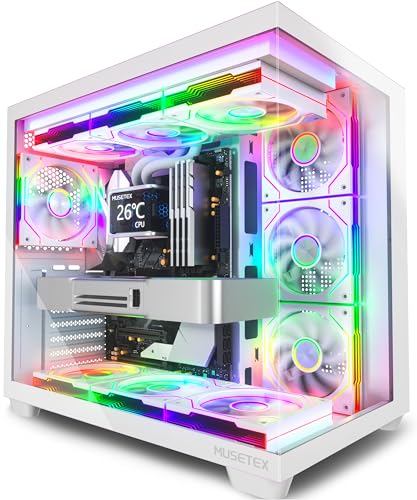
MUSETEX Y6 ATX Mid Tower Case with 7 ARGB Fans (White)

HYTE Y70 Touch Infinite Gaming PC Case (Snow White)

MUSETEX Y6 ATX Mid Tower Case with 4 Fans (Black)

Lian Li V100-ATX Mid-Tower PC Case V100RX (Black)

CORSAIR 3500X RS ARGB Panoramic Mid-Tower Case (White)

CORSAIR 3500X RS ARGB Mid-Tower Case (Black)

Lian Li O11 Vision Compact ATX Case O11VPW (White)
More Details On Our Top Picks
The white Y6 arrives with seven pre-installed 120mm infinity mirror PWM fans already mounted, which removes the fiddliest part of a first build entirely. Its 270-degree dual tempered glass panels give that uninterrupted aquarium view, and a front USB Type-C port keeps modern phones and peripherals happy.
In practice, this is the case you hand to someone building their first RGB rig. PWM control means fan speed follows CPU temperature automatically, so the rig stays quiet at idle without manual tuning.
Strong Points
- Seven fans pre-installed saves both money and an afternoon of screwdriving
- PWM fans self-regulate speed based on thermal load
- 270° glass coverage shows off graphics cards and custom loops from nearly every angle
- Type-C front port matches current motherboards and devices
Things To Consider
- Glass panels on all visible sides mean fingerprints show quickly; keep a microfiber cloth nearby
- The white finish looks sharp but scuffs are more visible than on black siblings
Key Specs
Who It Suits Best
First-time builders who want a complete, glowing showcase build without sourcing fans separately.
Where A Sibling Pick Shines
The black MUSETEX Y6 with four non-LED fans suits quieter, understated office builds where rainbow lighting isn’t the goal.
The Y70 Touch Infinite is the only chassis here that talks back. An integrated 2.5K LCD touchscreen sits in the front panel, giving you a live canvas for system stats, artwork, or widgets, and it responds to ten-point multi-touch like a tablet. The dual-chamber layout hides cables and drives behind the main compartment, which is what makes the clean glass look achievable.
Room for ten fans and a luxury PCIe 4.0 riser cable for vertical GPU mounting round out a genuinely premium package. The honest read: you’re paying for the screen, and if that doesn’t excite you, cheaper picks below deliver similar airflow.
What We Like
- Integrated 2.5K touch LCD turns the front panel into a functional display
- Dual chambers tuck power supply and cables out of sight
- Capacity for up to 10 fans supports serious liquid cooling
- Included PCIe 4.0 riser enables vertical GPU mounting without extra cost
Minor Gripes
- The touchscreen adds weight and a component that could fail over years of use
- Dual-chamber builds take longer to plan than open layouts
Made For
Enthusiasts building a desk centerpiece who want interactive system monitoring built into the case itself.
Skip It When
Budget-focused builders get better raw value from the MUSETEX Y6 white model, which includes seven fans instead of a screen.
This is the Y6 stripped back to essentials: same 270-degree dual tempered glass panorama as its white sibling, matte black finish, four non-LED fans pre-installed, and a Type-C front port. No lighting to configure, nothing to sync, just airflow and glass.
For a home office or living room build where a light show would feel out of place, that restraint is the point. The matte black texture also hides dust between cleanings better than glossy alternatives, which owners of glass-front cases commonly appreciate.
Upsides
- Four working fans included means usable airflow on day one
- Same wide 270° glass view as the pricier RGB version
- Matte black resists visible fingerprints and dust buildup
Small Caveats
- No ARGB fans means adding lighting later costs extra
- Four fans may leave top exhaust thin in hot climates or under sustained gaming loads
Right Fit For
Office and media-room builders who want the panoramic glass aesthetic without RGB anywhere in sight.
Another Choice May Suit
Anyone planning a lit-up showcase should step up to the seven-fan MUSETEX Y6 white edition instead.
Lian Li’s V100RX brings builder-grade engineering to the fish tank format. Four daisy-chainable 120mm ARGB PWM fans come pre-installed, and compatibility stretches across ATX, Micro-ATX, Mini-ITX, plus back-connect variants of ATX and Micro-ATX boards. That last part matters: back-connect motherboards route every cable behind the tray, turning the messiest build chore into a non-issue.
An integrated 26-LED strip adds ambient glow along the frame, and a dedicated display platform gives figurines or collectibles a lit stage inside the glass. Compared to the MUSETEX picks, this one targets builders who care about cable discipline as much as looks.
Highlights
- Back-connect motherboard support delivers the cleanest interior possible
- Daisy-chain fan connectors cut cable clutter dramatically
- Broad board compatibility from Mini-ITX up to full ATX
- Display platform adds personality beyond raw components
Points To Note
- Back-connect boards cost more and limit your motherboard choices
- Standard-build users won’t fully exploit the routing design
Feature Snapshot
Who Will Love This
Intermediate builders pairing it with a back-connect motherboard for a zero-clutter interior.
Swap It Out When
Builders using standard motherboards may find the Lian Li O11 Vision Compact a stronger fit for pure glass aesthetics.
Corsair’s 3500X RS wraps the whole front and side in continuous tempered glass, then solves the problem that usually comes with it: fans spinning behind glass push air awkwardly. The three included RS120-R reverse-rotor ARGB fans flip that logic, pulling fresh air through the side intake while the blades face outward for a clean, badge-free look.
Everything runs off a standard +5V ARGB motherboard header, so no proprietary controller is required. For white-themed builds, the snow-colored frame and matching fans make coordination effortless.
Bright Spots
- Reverse-rotor fans show a clean blade face through the glass while still intaking air
- Standard ARGB header means universal motherboard software control
- Spacious interior fits large graphics cards and tall CPU coolers
- Wraparound glass creates a truly seamless panoramic view
Softer Spots
- Three fans cover intake well but leave you buying top exhaust fans for heavy loads
- Continuous glass panels need frequent wiping in dusty rooms
At A Glance
Whose Shelf It Belongs On
White-theme enthusiasts who want showroom visuals backed by sensible reverse-fan engineering.
Reach For A Different Pick When
Owners of oversized triple-slot GPUs get added peace of mind from the black 3500X RS variant, which bundles GPU anti-sag support.
The black 3500X RS carries the same wraparound glass and trio of reverse-rotor RS120-R ARGB fans as the white version, with two practical additions worth noting. GPU anti-sag hardware ships in the box, which matters once you mount a heavy modern graphics card horizontally in a glass showcase. Compatibility with reverse-connection motherboards also future-proofs the chassis for cleaner cable routing down the line.
You may find the black finish more forgiving day to day, since dust and smudges simply don’t register the way they do on white panels. Same airflow story, lower visual maintenance.
Plus Points
- Included GPU anti-sag bracket protects expensive graphics cards long term
- Reverse-connection motherboard ready for future rebuilds
- Three high-airflow ARGB fans pre-installed
- Black finish hides dust between cleanings
Honest Caveats
- Anti-sag bracket needs correct installation to actually help
- Only three fans included for a chassis this size
Quick Facts
Who Should Grab It
Gamers running large, heavy GPUs who want showcase glass plus practical card support in one box.
Consider Something Else When
All-white build planners will prefer the matching white 3500X RS for a coordinated color scheme.
The O11 Vision Compact distills Lian Li’s famous O11 formula into a smaller footprint. Three tempered glass panels across the front, top, and left side create an uninterrupted view of your components, and the dual-chamber layout conceals an AIO’s tubing when the radiator mounts on the side. Back-connect motherboard support keeps the main chamber visually empty except for hardware.
A swappable top mesh panel accommodates a 360mm AIO, balancing glass beauty against real thermal headroom. It’s the most refined option here, though it expects a builder comfortable with dual-chamber planning.
Reasons To Buy
- Three-panel glass design delivers a genuinely seamless view
- Side-mounted AIO hides tubing inside the second chamber
- Removable top mesh supports 360mm radiators
- Compact footprint suits smaller desks
Trade Offs
- No fans included, so budget for a full cooling set separately
- Dual-chamber routing takes patience on a first attempt
Core Details
Built With In Mind
Experienced builders planning a 360mm AIO loop who want maximum glass with minimum visible clutter.
Not Your Match When
First-timers wanting fans in the box will find the MUSETEX Y6 white edition far more forgiving.
What Matters Most Before Choosing Fish Tank Pc Cases
Airflow Behind The Glass
Glass looks great and breathes poorly, so intake placement decides everything. Reverse-rotor fans, like those on the Corsair 3500X RS, let air enter through glass panels while keeping the blade face clean. Count your fans before committing: three covers a mid-range build, while sustained gaming or a 360mm AIO wants five or more.
Chamber Layout And Cables
Dual-chamber designs hide the power supply, drives, and cable bulk behind the display area, which is how showcase builds stay spotless. Back-connect motherboard support takes this further by routing connectors behind the tray itself. The trade-off is planning time and, for back-connect, a shorter list of compatible boards.
Fans In The Box Or Not
Pre-installed fans save real money and assembly effort, especially seven-fan packages like the MUSETEX Y6. Cases sold bare, such as the O11 Vision Compact, assume you’ll buy cooling separately, so compare total build cost rather than case price alone.
Size And Desk Reality
Panoramic mid towers run wider than standard cases because glass extends past the frame. Measure your desk depth and check clearance for the front panel before ordering, particularly in compact workspaces.
Key Considerations Across These Picks
Traps First Timers Fall Into
The classic mistake is falling for glass first and checking fan count second, then discovering a hot, loud machine after assembly. Another common slip: ignoring GPU clearance and anti-sag support until a heavy card arrives. Read the supported motherboard list carefully too, since back-connect cases lock you into specific boards.
What Separates Premium From Basic
Higher-tier cases spend money where you can’t see it: thicker glass, daisy-chain fan wiring, riser cables for vertical GPUs, and chamber layouts engineered around liquid cooling. Paying up makes sense for a long-term showcase build; for a first rig, a well-equipped budget chassis gets you 80 percent of the look.
Bottom Line
Every case here earns its glass honestly, with airflow and layout doing the quiet work behind the shine. Match the pick to your build: the MUSETEX Y6 white for a complete first RGB rig, the Corsair 3500X RS for refined reverse-fan engineering, and the Lian Li O11 Vision Compact for a serious liquid-cooled centerpiece. Whichever direction you go, measure your desk, count your fans, and enjoy the view.
